Microscope troubleshooting is one of the most common challenges faced by students, researchers, laboratory technicians, and industrial inspectors. Even high-quality microscopes can occasionally develop image quality issues, focusing problems, lighting failures, or mechanical faults.
Fortunately, most microscope problems can be resolved quickly through proper inspection, cleaning, and routine microscope maintenance. This guide explains the most common microscope issues, their causes, and practical solutions to help restore optimal performance.
Why Microscope Problems Occur
Microscopes are precision optical instruments that rely on clean lenses, proper alignment, and regular maintenance.
Common causes of microscope problems include:
- Dust and contamination
- Improper handling
- Lens damage
- Incorrect illumination settings
- Mechanical wear
- Poor maintenance practices
Identifying the root cause is the first step in effective microscope troubleshooting.
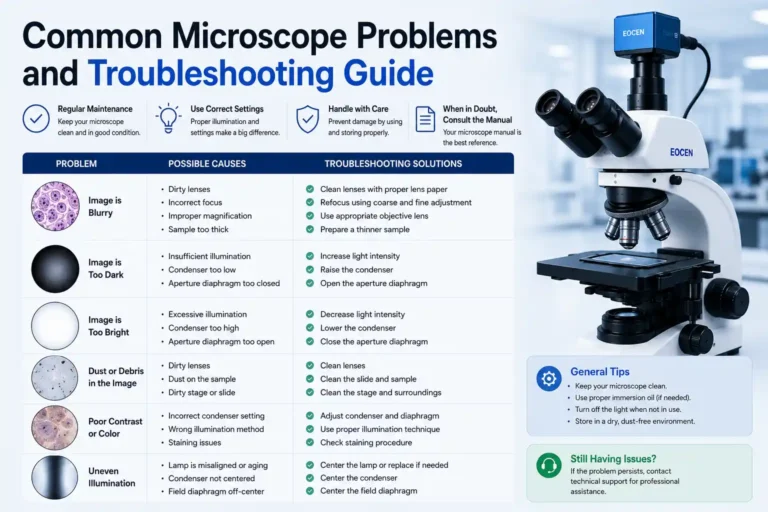
Microscope Image Is Blurry
A blurry image is one of the most frequently reported microscope issues.In many cases, image clarity issues are related to the balance between magnification and resolution, not just focus adjustments.
Dirty Lenses
Dust, fingerprints, or oil residue on lenses can significantly reduce image clarity.
Solution:
- Clean lenses using lens paper
- Use approved optical cleaning solutions
- Avoid touching optical surfaces directly
Incorrect Focus
Improper adjustment of coarse and fine focus controls may result in blurred images.
Solution:
- Start with low magnification
- Focus gradually
- Adjust fine focus carefully
Improper Illumination
Poor lighting often creates the appearance of a blurry image.
Solution:
- Adjust brightness levels
- Align illumination properly
- Verify condenser settings
Microscope Will Not Focus Properly
If the specimen remains unclear regardless of focus adjustments, several factors may be responsible.
Possible causes:
- Incorrect objective lens selection
- Improper slide placement
- Damaged focus mechanism
- Sample positioned outside the focal range
Troubleshooting steps:
- Switch to the lowest objective lens.
- Verify slide positioning.
- Slowly adjust coarse focus.
- Refine image sharpness using fine focus.
Understanding microscope specifications can help users avoid common focusing and imaging issues when selecting new equipment. See our microscope buying guide for more information.
Microscope Light Is Not Working
Illumination failure is another common microscope problem.
Potential causes include:
- Burned-out bulb
- Loose power connection
- Faulty power supply
- Brightness control settings
Before requesting service:
- Check power cables
- Inspect the light source
- Test brightness adjustments
- Confirm outlet functionality
Many issues can be resolved without professional repair.
Dark or Low-Contrast Images
Users sometimes report that images appear dark even when illumination is active.
Common causes:
- Condenser misalignment
- Low light intensity
- Dirty optics
- Incorrect diaphragm settings
Improving illumination alignment often restores image quality immediately.
Double Images or Eye Strain
Binocular microscopes occasionally produce uncomfortable viewing experiences.
Possible reasons:
- Incorrect interpupillary distance
- Diopter mismatch
- Poor eyepiece alignment
Adjusting eyepiece settings usually eliminates eye strain and image duplication.
Stage Movement Problems
Mechanical components can become difficult to operate over time.
Symptoms include:
- Sticky stage movement
- Uneven travel
- Limited adjustment range
Recommended actions:
- Remove dust and debris
- Inspect mechanical controls
- Follow manufacturer maintenance guidelines
Excessive force should never be applied to microscope controls.
How Regular Microscope Maintenance Prevents Problems
Routine microscope maintenance significantly reduces equipment downtime and extends service life.
Best practices include:
Clean Optical Components Regularly
Use only approved optical cleaning materials.
Protect Against Dust
Cover the microscope when not in use.
Store Properly
Keep microscopes in dry, temperature-controlled environments.
Inspect Moving Parts
Check focus mechanisms and stage controls periodically.
Schedule Preventive Maintenance
Professional servicing helps identify issues before they become serious problems.
Microscope Troubleshooting Checklist
Before contacting technical support, verify the following:
✓ Lenses are clean
✓ Illumination is functioning
✓ Objective lens is properly engaged
✓ Specimen is correctly positioned
✓ Focus controls are operating normally
✓ Condenser settings are correct
✓ Power connections are secure
Many common microscope issues can be resolved using this simple checklist.
Frequently Asked Questions About Microscope Troubleshooting
The most common causes include dirty lenses, improper focus, incorrect illumination settings, or contamination on optical components.
Microscope focus problems are often caused by incorrect slide positioning, improper objective selection, or focus adjustment errors.
Microscope lenses should be inspected regularly and cleaned whenever dust, fingerprints, or residue affect image quality.
Common causes include failed bulbs, loose power connections, faulty power supplies, or incorrect brightness settings.
Improving image quality typically involves cleaning optics, optimizing illumination, adjusting focus correctly, and ensuring proper specimen preparation.
For industrial inspection applications, high-quality industrial microscopes can provide improved optics, imaging performance, and measurement capabilities.
Routine lens cleaning is one of the most important microscope maintenance procedures and helps maintain optimal image clarity.
Proper handling, regular cleaning, dust protection, and preventive maintenance significantly reduce the likelihood of microscope issues.
Basic cleaning and troubleshooting are generally safe. However, internal optical or electrical repairs should be performed by qualified technicians.
Dark images are often caused by low illumination, condenser misalignment, dirty optics, or incorrect diaphragm settings.
Professional servicing is recommended when troubleshooting fails to resolve the issue or when optical, mechanical, or electrical components require adjustment.
Recommended Microscope Solutions
If recurring microscope problems affect your workflow, upgrading to a professional microscope system may improve image quality, reliability, and inspection efficiency. Murzider offers solutions for biological research, industrial inspection, and digital imaging applications.
Conclusion
Effective microscope troubleshooting begins with understanding the most common causes of image quality, focus, illumination, and mechanical problems. By following proper cleaning procedures and routine microscope maintenance, users can prevent many issues before they affect performance.
Whether used in laboratories, educational institutions, industrial inspection environments, or research facilities, a well-maintained microscope delivers clearer images, more reliable observations, and a longer service life.